Skip to content

Keep the whole family on the same page.

Schedules, homework, routines, expenses, messages, and the records that matter, together in one private space made for two homes. Less back-and-forth, nothing forgotten, and a lot less stress.

Private by default

Your data stays yours, and sensitive alerts stay off the lock screen.

Records you can stand behind

Messages and logs are timestamped, tamper-evident, and ready to export.

Calmer messages

Soften rewrites a heated message before you hit send.

A parent calmly checking the day's family plan on their phone by a sunlit window

Your family plan shouldn't live in six different apps.

The schedule's in one place, the receipts in another, and the conversation that actually mattered is buried in a text thread you'll never scroll back to. Tutola family pulls it together so both homes work from the same picture.

One place for everything

Events, routines, homework, handoffs, and each child's details live together, organized around your family instead of scattered across apps.

Messages that don't escalate

When a message comes out sharper than you meant it, Soften offers a clearer version before it sends.

A paper trail when it counts

Incident notes, agreements, expenses, and care exchanges are saved and ready to export the day you actually need them.

Privacy built in

Quiet notifications, screen protection, session controls, and strict data boundaries come standard, not as an upsell.

Built for the week you actually have.

Most weeks are the same juggle: who's where, what's due, whose turn it is. Tutola family takes the repeat work off your plate, with a color for each child so the whole plan reads in a glance.

Calendar

See the full month or zoom into a week. Filter by child, event type, custody pattern, or handoff so you only see what's yours.

Child profiles

Essentials, medical notes, school details, and routines for each child in one place, ready the moment a sitter or co-parent needs them.

Homework

Assignments, due dates, subjects, and reminders stay on track without digging through the school portal.

Routines

Build step-by-step routines with timers so mornings, bedtimes, and handovers run the same way every time.

The day-to-day and the hard conversations, in one place.

Co-parenting is half scheduling, half diplomacy. Tutola family gives you both: the tools to coordinate life across two homes, and a calmer way to talk when things get tense.

Two co-parents and their child during a calm, friendly handoff between homes
Tutola family co-parent relationships screenshot

Co-parent relationships

See every linked child, who can access what, and how your co-parenting is tracking, all on one screen.

  • Linked children and shared access for each relationship
  • A co-parenting health score that flags what still needs setting up
  • Trusted adults and pending invites in a single list
Tutola family shared expenses screen showing open, settled, and disputed balances

Shared expenses

Log who paid, what's still open, and what's in dispute, with the receipt attached to the entry. No more "I already sent you that."

  • Open, settled, and disputed at a glance
  • A receipt on every expense
  • Running settlement totals per family
Tutola family calendar screen used for co-parenting handoffs and everyday coordination

Care exchanges

Keep the time, place, and notes for every handoff in one timeline, so nobody has to guess later what was agreed.

  • Pickup and drop-off locations on record
  • Notes that capture the handoff context
  • A clean timeline you can look back on

Soften

Send the message. Skip the fight.

Co-parenting messages carry a lot. As you type, Soften quietly flags a draft that reads as tense, and with one tap rewrites it into something calm and clear. Every fact, date, and request stays intact. Nothing sends on its own, so you stay in control.

Catches tension early

A quiet nudge appears when a draft reads as harsh or accusatory, before it ever leaves your hands.

One tap to soften

Turns a heated message into something brief, clear, and firm that keeps the focus on your kids.

Keeps your facts

Dates, times, names, and requests stay exactly as you wrote them. Soften changes the tone, not the substance.

Always your call

Soften only suggests. It never sends for you, and you can switch it off anytime in Settings.

Tutola Soften message rewrite screenshot

If it ever gets serious, the history is already there.

Nobody hopes to need a record. But when a lawyer, mediator, or judge asks what happened and when, you'll have it: organized, timestamped, and ready to hand over. Tutola family isn't legal advice. It just keeps the facts in order.

Tutola family records screen with the incident journal and document library

Incident Journal

Write it down while it's fresh. You get 24 hours to edit, then the entry locks into a permanent, timestamped timeline.

Document Vault

Court orders, school forms, and medical records, filed by category and sensitivity, so the right document is one tap away.

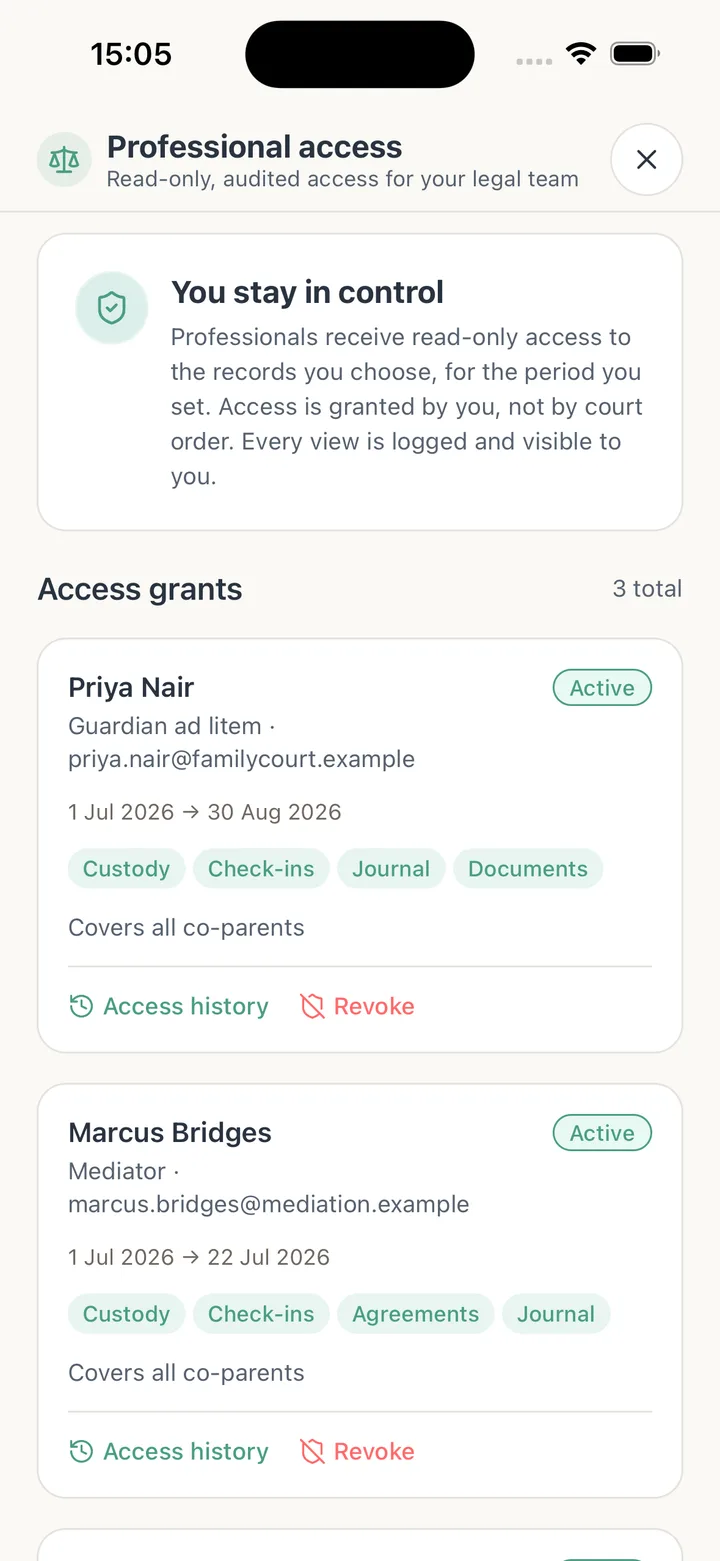
Professional Access

Give your attorney or therapist time-limited, read-only access to exactly what you choose. Every view is logged.

Export when asked

Bundle custody history, care exchanges, agreements, expenses, receipts, and child details into one export when someone needs the full picture.

Your family's information stays your family's business.

When things are tense, privacy isn't a nice-to-have. Tutola family treats every detail as sensitive by default, with real protection around who gets in and what they can see.

Data stays in your family

Every record is scoped to your family at the database level, so accounts can't see across each other.

Quiet lock screen

Keep message previews and sensitive details out of your notifications.

Screenshot protection

Sensitive screens can block screen capture on devices that support it.

Two-factor login

Add app-based two-factor authentication for an extra lock on your account.

Face or fingerprint lock

Require Face ID or a fingerprint, and auto-lock when the app sits idle on a shared phone.

Control every session

See active devices, get alerted on new sign-ins, and share a private read-only calendar feed.

Set up in three steps.

No long onboarding. Start with your family and add the rest as you go.

1

Create your family

Set up your private family space and pick what you want to organize first.

2

Add children and co-parents

Build child profiles, invite a co-parent or sitter, and decide who sees what.

3

Stay in sync

Share schedules, swap handoff notes, split expenses, message, and keep records as life happens.

For attorneys, mediators, and therapists

See exactly what the family shares. Nothing more.

Skip the forwarded screenshots and the 200-message thread. Families grant you time-limited, read-only access to the records that matter, and every view is logged so both sides stay accountable.

See how professional access works
A family attorney reassuring a parent client while reviewing shared records

Simple pricing. Start with 14 days free.

Every family begins on a 14-day Complete trial with full access. Stay on Essential for day-to-day coordination, or move up to Complete when you need records, exports, and deeper insight.

Most popular

Essential

Everything most families need to run two homes: schedules, expenses, routines, and each child's essentials.

£6.99per month
Start your 14-day trial
  • Up to 5 children, co-parents, and family members
  • Unlimited events and routines
  • Custom custody schedules and shared expenses
  • Handoff notes and care exchanges
  • Reading logs
  • Document vault (up to 3 files)
  • Soften tone de-escalation (5 rewrites/mo)
  • Private calendar sync
  • 1 GB document storage
  • Priority support

Complete

For higher-conflict situations: advanced records, certified exports, custody insights, and more storage.

£12.99per month
Start your free trial
  • Everything in Essential, plus:
  • Unlimited children, co-parents, and members
  • Soften message de-escalation
  • Incident Journal and Document Vault
  • Professional Access with audit trail
  • Custody calendar and analytics
  • Certified, tamper-verified record exports
  • 10 GB storage and unlimited history
On every plan: two-factor login, biometric app lock, new-device alerts, private calendar sync, and tamper-evident messaging. Every family starts with a 14-day Complete trial with full access. Tutola family is pre-launch, so store links and billing are still being finalized.

Questions parents ask us.

Straight answers, no overpromising.

A blended family laughing together over a relaxed dinner at home

Ready to get the whole family on the same page?

Tutola family is launching soon on iOS and Android. The store buttons below are placeholders while we finish the listings, so check back shortly.